
ReplyForge logo

Add comments to your static site.
Own your data.
Keep out the bots.

ReplyForge is a self-hosted REST API that gives your blog a fast, private comment system with built-in moderation and Turnstile spam protection.

terminal
$ docker compose up
[+] Running 1/1
Container replyforge-appStarted
$curl https://replyforge.example.com/api/v1/comments
{
"data": [
{
"id": 42,
"display_id": "aB3xK7",
"post_id": "my-blog-post-1",
"author_name": "Alice",
"body": "Great article, thanks for sharing!",
"approved": true,
"created_at": "2026-07-19T12:00:00Z"
}
],
"pagination": {
"page": 1,
"per_page": 20,
"total": 1,
"total_pages": 1
}
}
The Problem with Existing Solutions

There's a better way. Meet ReplyForge.

Why ReplyForge?

How It Works

1

Reader submits a comment

through your HTML form (with Turnstile widget).

2

ReplyForge validates, sanitizes, and stores it

marked as unapproved.

3

You approve it

via the admin UI or API, and it's publicly visible.

Everything is synchronous, no queues, no extra infrastructure. Just HTTP.

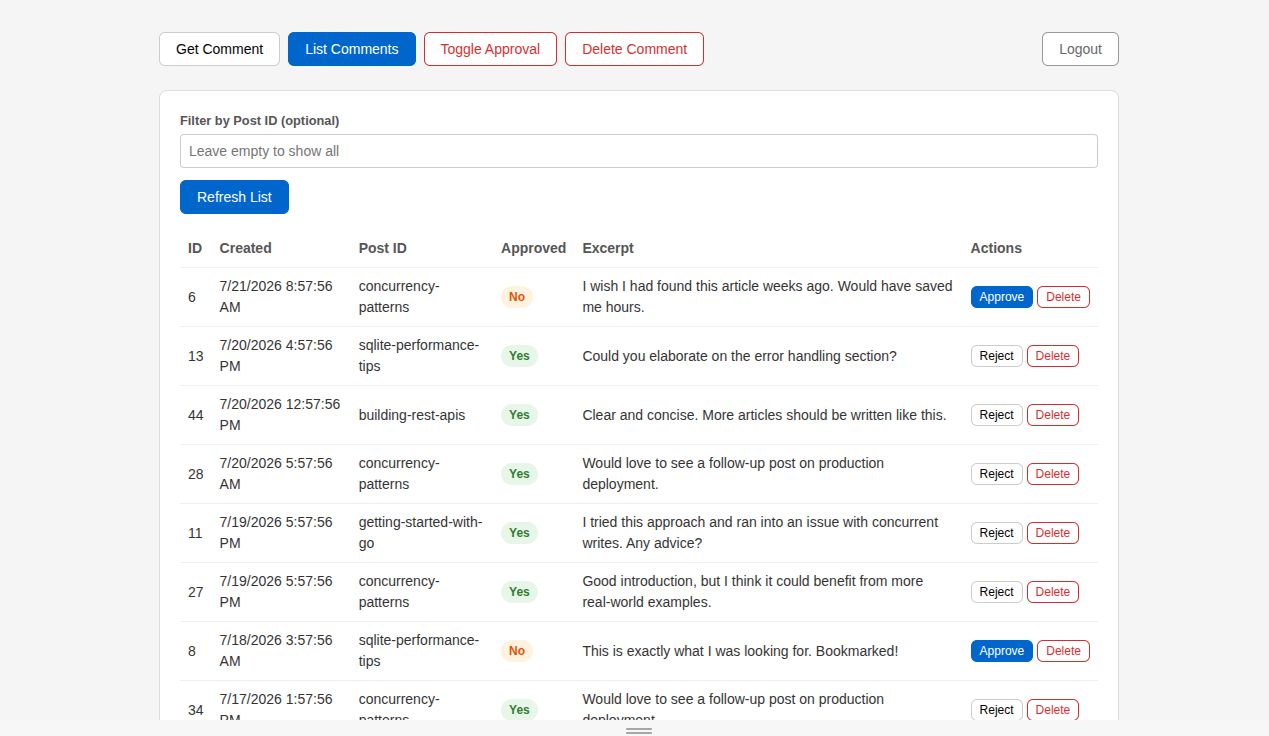
Admin at a Glance

Clean, no-frills moderation from your browser. One password, no accounts.

Endpoints also available for automation— integrate with your CI or custom scripts via the admin API.

/admin
ReplyForge admin dashboard showing pending comments with approve and delete buttons

Why You'll Love the API

  • "error": {
      "code": "VALIDATION_ERROR",
      "message": "...",
      "details": [...]
    }

    Predictable Errors

    Every error follows the same JSON structure with a machine-readable code, human-readable message, and per-field details. A unique X-Request-ID header on every response makes tracing trivial.

  • RATE_LIMIT_RPM=10
    RATE_LIMIT_BURST=15

    Rate Limiting

    Per-IP rate limiting with configurable requests-per-minute and burst capacity. No external Redis required — the limiter runs entirely in-process. Exceeding the limit returns a clean 429 Too Many Requests.

  • // Server-side sanitization
    HTML tags stripped
    Unicode NFC normalized
    Null bytes removed
    Whitespace collapsed

    Auto Sanitization

    author_name and body are sanitized before they ever touch the database. Every input is trimmed, HTML-stripped, Unicode-normalized, and purged of null bytes — automatically.

  • "display_id": "aB3xK7"

    display_id in Every Response

    Every comment gets a short, unique identifier generated via sqids. Use it in URL fragments, client-side references, or anywhere you need a compact, user-friendly pointer to a comment.

terminal
$ curl -X POST https://example.com/api/v1/comments \
    -H "Content-Type: application/json" \
    -d '{
      "post_id": "hello-world",
      "author_name": "Jane",
      "body": "Loved this post!",
      "turnstile_token": "0x4AA..."
    }'

# 201 Created
{
  "data": {
    "id": 42,
    "display_id": "aB3xK7",
    "post_id": "hello-world",
    "author_name": "Jane",
    "body": "Loved this post!",
    "approved": false,
    "created_at": "2026-07-22T12:00:00Z"
  }
}

Quick Start — Deploy in Minutes

docker-compose.yml
name: replyforge

volumes:
  app_data:
  caddy_data:
  caddy_config:

services:
  comments:
    image: dockershepherd/replyforge:<version>
    env_file: .env
    volumes:
      - ./data:/app/data
    restart: unless-stopped

  web:
    image: caddy:<version>
    restart: unless-stopped
    ports:
      - "80:80"
      - "443:443"
      - "443:443/udp"
    volumes:
      - ./conf:/etc/caddy
      - caddy_data:/data
      - caddy_config:/config
Caddyfile
example.com{
    encode zstd gzip

    log{
        output file /var/log/caddy/access.log
    }

    reverse_proxy comments:8080
}

Point your static site's JavaScript to https://example.com and you're done.

No Docker? Download the single binary. No database to install; SQLite is embedded.